Hey guys, if you’re reading this, chances are you’ve got a paper discharger (or a few) on your production line that’s acting weird—maybe it’s spitting out misaligned sheets, double-feeding, or even jamming so bad you’re losing 20 minutes a shift. Been there, done that, fixed a million of these over the years as a paper discharger supplier, so I’m gonna break down how to calibrate your unit like a pro, no fancy degree or 10-step manual that makes zero sense. Let’s keep this real, okay? Paper Discharger

First, let’s get one thing straight: calibrating a paper discharger isn’t just “twist a knob till it works.” It’s about matching the unit to your exact paper type, speed, and line setup. I’ve seen people waste hours adjusting this and that because they skipped the pre-calib checks—total rookie move. Before you even touch a single screw, grab your notes (or my cheat sheet, linked in the bio if you want it) and check four non-negotiables:
- What paper are you running? Plain office copy? 100# cardstock? Glossy brochure stock? Kraft? If you’re calibrating for copy but running cardstock next week, you’ll just be setting yourself up for a jam. Most dischargers come with default settings for 20lb bond, but that’s a one-size-fits-all that fits no one.
- Line speed. If your presses, cutters, or sheeters are running 5,000 sheets an hour vs. 10,000, the discharger’s timing has to shift. I’ve had customers call panicking because their new line speed was faster than their old one, and the discharger was dropping sheets too soon.
- Air supply. Wait, air? Yeah—most modern paper dischargers (the good ones, anyway) use pneumatic suction to pull sheets, so if your shop air is at 80psi one day and 60 the next, suction is off. No amount of knob-twisting will fix that. Check your gauge first.
- Alignment with upstream equipment. Is the discharger sitting level with the sheeter exit? If it’s tilted, sheets will slide one way and jam on the guides. Most people forget this, and it’s the #1 complaint we get from new buyers who skip site setup.
Okay, pre-calib done. Now let’s actually calibrate, step by step, like I’m walking you through my workshop. I’ll be referencing our standard semi-automatic discharger, which is what 80% of our customers run, but most of this applies to full-auto too.
First, calibrate the suction system. This is the heart of the discharger. If the suction’s too weak, it’ll pull multiple sheets or none at all. Too strong, and it’ll crumple thin paper. Here’s how:
- Locate the suction regulators (they’re usually on the side of the main blower unit, labeled “LOW” and “HIGH”).
- Grab a stack of your actual production paper—don’t use test paper, that’s lazy. Put 10 sheets on the feed table, turn the blower on.
- Adjust the suction: start at the LOW setting, and slowly turn it up till the top sheet lifts cleanly, but doesn’t pull the 2nd. If it’s pulling 2 sheets, dial it down. If it’s only lifting half a sheet, dial it up. For thicker paper (120# and up), you might need to adjust the individual suction nozzles too—some dischargers have adjustable nozzle height. Don’t have all nozzles at the same height; stagger them a little so they lift sheets evenly. I see people crank all nozzles to max height and wonder why the edges of the stack are lifting but the middle isn’t. Duh.
Next, sheet separation timing. This is where a lot of people mess up. The suction cups need to lift the top sheet, and the separator fingers (those little metal or rubber tabs that prevent double-feeds) need to kick in at exactly the right time. If the fingers engage too early, they’ll tear the top sheet. Too late, and you get doubles or triples.
- Find the timing adjustment: it’s usually a bolt on the shaft that drives the fingers, or a potentiometer on the control box labeled “SEPARATOR TIMING.”
- Run one sheet through manually (use the test run button, not full cycle) and watch: the suction cup lifts the top sheet, and right as that sheet starts moving toward the output conveyor, the separator fingers should drop in and hold the rest of the stack down.
- If fingers are dropping too soon: turn the timing knob clockwise a little, test again. Too late: counterclockwise. Pro tip: mark the shaft with a Sharpie before you adjust, so if you overdo it, you can move it back. Saved me so many times.
Third, output alignment and stacking height. No one cares if the discharger feeds perfect sheets if they’re stacked crookedly or falling off the output table. This is super important if you’re feeding into a folder, gluer, or any downstream machine that needs straight stacks.
- First, check the side guides. They need to be exactly the width of your paper, with 1-2mm of clearance max. If they’re too tight, sheets will jam when they hit them. Too loose, they’ll shift. Run a stack of 5 sheets through and see how aligned they are. Adjust the guide knobs (they’re usually the big plastic ones on the side of the output table) till each sheet lines up straight, no gaps or overhangs.
- Now the stacking height sensor. Most dischargers have a photoeye or a mechanical arm that tells the unit when to lower the output table as stacks get taller. If it’s set too high, the top of the stack will hit the suction cup when the next sheet comes. Too low, and sheets will drop from too high, damaging the edges.
- The easiest way to calibrate this: stack 10 sheets, run them all through, and watch when the table lowers. When the 10th sheet lands, the table should lower just enough to leave 1cm clearance between the top of the stack and the suction cup. Adjust the sensor’s position (or the potentiometer labeled “STACK HEIGHT”) till that happens. If you have variable sheet lengths, some dischargers let you input the sheet size into the control panel—use that! It’ll auto-adjust the stacking height for you, no manual work.
Wait, what if you have a digital discharger? Same general steps, just the controls are on a touchscreen instead of knobs. Most of our digital models have a built-in calibration wizard, but don’t just hit “auto-calib” and walk away. The auto-setting is a baseline—you still need to test with your actual paper and tweak. I had a customer last month who did auto-calib on our digital discharger, and it was fine for copy paper, but when he ran cardstock, it was jamming. Turns out the auto-set used the standard suction for 20lb bond, not the 120# cardstock he was running. So always test after auto-calib.
Now, common mistakes I see all the time, so you can avoid them:
- Ignoring wear and tear. The suction cups get worn down after 6-12 months of use, so their grip gets weaker. The separator fingers can get bent or covered in paper dust, so they don’t hold the stack down. Clean the suction cups every month (wipe them with a damp cloth, no harsh chemicals) and check the fingers for bends. I stock replacement parts for all our models, so it’s easy to swap them out when they get worn.
- Not calibrating after changing paper. Like I said earlier, 20lb vs. cardstock? Different settings. Even glossy vs. matte paper—glossy is slipperier, so you might need a little more suction, or adjust the side guides a tiny bit. I tell all our customers to keep a log: what paper, settings, speed, and how it performed. That way when they switch back to the same paper 6 months later, they don’t have to re-calib from scratch.
- Forgetting to check line speed. If you upgrade your downstream machine, your discharger has to keep up. Last year a customer bought a new sheeter that ran 2,000 sheets an hour faster, and he didn’t adjust his discharger’s cycle time. So the discharger was dropping sheets every 10 minutes because it couldn’t feed them fast enough. Super easy fix—just adjust the cycle time potentiometer, and it was back to normal.
What about if your discharger is still acting up after calibration? Here’s a quick troubleshooting checklist we give our customers:
- Jamming on the input? Check if the feed table is level, or if there’s paper dust on the suction cups.
- Double-feeding? Suction too high, or separator fingers worn.
- Sheets shifted on output? Side guides too loose, or stacking height off.
- Crumpled sheets? Suction too high, or suction cups misaligned.
At the end of the day, calibrating a paper discharger is all about matching the unit to your specific setup, not following a generic manual. I’ve worked with everything from small print shops with 10,000 sheets a day to big corrugation plants with 100,000, and the core steps are the same—you just tweak for your unique needs.
If you’re still struggling, or you need a new discharger that’s built to hold calibration (our units have a 2-year warranty and we provide free setup help, FWIW), reach out. No pushy sales talk, just real help from someone who’s been in your shoes. We’ve got models for every line speed and paper type, so we can hook you up with something that works for your shop.
Wait, one last tip: don’t rush calibration. Take 30 minutes, test with at least 50 sheets of your actual production, and adjust till they’re all straight, no jams, no doubles. It’s way better than wasting 2 hours fixing a jam mid-shift.
References
- TAPPI Standard TIS 0501-19, Calibration of Paper Handling Equipment
- "Industrial Pneumatic Systems: Maintenance and Calibration Guidelines", 2022, Fluid Power Society
- Operator Manuals for Standard Paper Discharger Models, Manufacturer Specifications
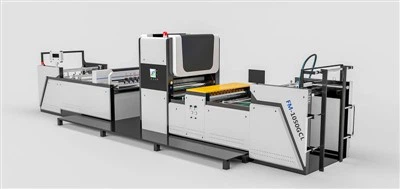
Flute Laminating Machine And that’s it—calibration made simple, no jargon, no wasted time. If you need more tips or want to chat about upgrading your discharger, just get in touch. I’m here to help.
Zhejiang Dai’s Printing Machine Co., Ltd.
Zhejiang Dai’s Printing Machine Co., Ltd. is one of the most experienced paper discharger manufacturers and suppliers in China, also supports customized service. Please rest assured to buy bulk durable paper discharger at low price from our factory. For pricelist, contact us now.
Address: No. 797, Nanming Road, Shuige Industrial Park, Liandu District, Lishui City, Zhejiang Province, P.R. China
E-mail: 3376094828@qq.com
WebSite: https://www.dais-machine.com/
